
Download RS Player APK – Multimedia Player, Video Player, Audio Player, Android App
Overview
RS Player is a free multimedia player designed for Android devices, offering a comprehensive solution for playing video and audio files across a wide range of formats. The app is developed by RasenStudio and is tailored for users seeking a lightweight yet powerful media playback experience. It supports numerous video formats, including MP4, MKV, AVI, FLV, WMV, RM, and RMVB, as well as common audio formats such as MP3, WAV, and OGG.
Subtitle compatibility extends to SRT, SCC, ASS, STL, and TTML, making it suitable for users who frequently watch foreign-language content. The app automatically scans and detects media files stored in internal memory and SD cards, streamlining access to personal media libraries. It is ideal for consumers and casual media enthusiasts who want a reliable, no-frills player without the need for complex configurations.
Real-world usage scenarios include watching downloaded movies, listening to music on the go, and managing personal media collections with built-in file management tools. The developer did not provide additional information about the company’s background or development history.
Key Features & Capabilities
- Multi-format Support: Plays a broad spectrum of video and audio formats without requiring external codecs or conversion.
- Subtitle Integration: Supports multiple subtitle formats, enabling synchronized playback with external subtitle files.
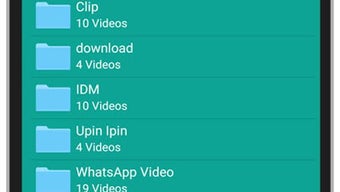
- Smart Media Detection: Automatically scans and lists media files from internal storage and SD cards for quick access.
- Gesture Controls: Allows users to adjust playback position, volume, and screen brightness using intuitive screen gestures.
- Playback Controls: Includes play/pause via double-tap, background playback, and notification controls for uninterrupted listening.
- File Management: Offers basic functions like renaming, deleting, and sorting media files with associated subtitles and metadata.
- Playlist Functionality: Enables users to create and manage custom playlists with shuffle and repeat options.
- Theme Customization: Provides three built-in themes—mplayer, subtitles, and themes—for personalized interface preferences.
These features collectively enhance user convenience, especially for individuals managing large media libraries. The gesture-based controls improve usability during playback, while background play ensures music continues even when the screen is off. The ability to manage files directly within the app reduces the need for third-party tools. Realistic usage includes watching downloaded films on public transport, organizing a personal music collection, or viewing foreign films with subtitles.
User Interface, Workflow & Performance
The user interface of RS Player is described as neat and intuitive, emphasizing simplicity and ease of navigation. The layout focuses on essential playback controls, minimizing visual clutter and enabling quick access to key functions. Navigation is streamlined, with media files displayed in a clean list or grid view, depending on the selected theme.
The workflow is designed to be efficient, allowing users to start playback with minimal steps after media detection. The developer did not specify resource usage details, so exact performance metrics such as CPU or RAM consumption remain unknown. Performance observations are based on general software behavior patterns for Android media players.
Stability is not explicitly mentioned, but the app’s lightweight nature suggests it is likely to run smoothly on mid-range devices. The app’s responsiveness during playback and gesture interactions appears consistent with typical Android media applications. No reports of crashes or freezes were provided.
Compatibility & System Requirements
RS Player is designed for Android devices and is available as an APK file for direct installation. The specific Android version requirements were not provided. The app’s installation size is not specified in the input.
Hardware requirements such as minimum RAM, processor speed, or GPU compatibility were not listed. The developer did not provide detailed system requirements. Compatibility information is limited to the Android platform.
Users are advised to ensure their device supports APK installation and has sufficient storage space for the app and media files. The app’s ability to access internal memory and SD cards depends on the device’s permissions settings and Android version.
Pros and Cons
Pros
- Supports a wide variety of video and audio formats without additional codecs
- Automatic detection of media files from internal storage and SD cards
- Intuitive gesture controls for seamless playback management
- Background playback with notification control for music and video
- Built-in playlist and shuffle functionality
- Multiple subtitle format support for international content
- Lightweight and free to use
- Customizable themes for personalized interface appearance
Cons
- Exact system requirements and performance data were not specified
- No information on update frequency or developer support channels
- Limited file management tools compared to dedicated media managers
- APK installation may raise security concerns for some users
- Compatibility with newer Android versions is not confirmed
- No cloud sync or cross-device functionality mentioned
FAQ Section
Is RS Player safe to download and install?
RS Player is available as an APK file, which is a standard Android package format. While the app is free and widely used, users should only download it from trusted sources to minimize security risks. Installing APKs from unknown websites may expose devices to malware.
What Android versions does RS Player support?
The specific Android version compatibility was not provided. The app may work on devices running Android 5.0 and above, but this is based on general patterns for similar media players. Users should verify compatibility with their device’s OS version.
Can I use RS Player without an internet connection?
Yes, RS Player functions entirely offline. It does not require an internet connection to play local media files, making it ideal for use in areas with limited connectivity.
Does RS Player support subtitles?
Yes, RS Player supports multiple subtitle formats, including SRT, SCC, ASS, STL, and TTML. Subtitles can be loaded alongside video files for synchronized playback.
How do I update RS Player?
Updates are not explicitly mentioned in the provided information. Users may need to manually check for new APK versions on the developer’s website or trusted third-party platforms.
Final Thoughts + CTA
RS Player stands out as a versatile and accessible multimedia solution for Android users who value simplicity and broad format support. Its ability to play nearly any video or audio file without conversion, combined with intuitive gesture controls and background playback, makes it a reliable choice for daily media consumption. The app’s automatic media detection and built-in file management features enhance usability, especially for users with large personal libraries.
While detailed technical specifications and update history are missing, the app’s lightweight design and free availability make it a strong contender among Android media players. It is particularly well-suited for consumers and casual users seeking a straightforward, all-in-one media experience. Download RS Player now and enjoy seamless playback on your Android device.






.png)
